A dedicated email address under the domain @zeal.corsearch.com, which will serve the following functions:
CC recipient for all enforcement emails sent by the system
Inbox for receiving replies from platforms or third parties, for manual review
Optional sender address for sending follow-up responses
This email address must be registered and configured in Zeal 2.0.
Example Use Case
We send enforcement emails on behalf of Brand, and copy all correspondence to:
brand@zeal.corsearch.com – This address is then configured within Zeal 2.0 in Settings > General.
Note: It’s acceptable to reuse the same email address across multiple Zeal 2.0 organizations, such as when a single client has multiple brands.
How do I Set Up?
Request Email Creation
To add a forwarding alias for a mailbox, submit a ticket to IT Ops via support.corsearch.com with the following:
Request the creation of the new email address (e.g., brandname@zeal.corsearch.com)
Have it added as an alias to the existing Google Group used for enforcement
If no Google Group exists, request the creation of a new one with a Collaborative Inbox setup.
Note: For urgent matters or escalations, post a message in #ask-it with a link to your ticket.
Configure in Zeal 2.0
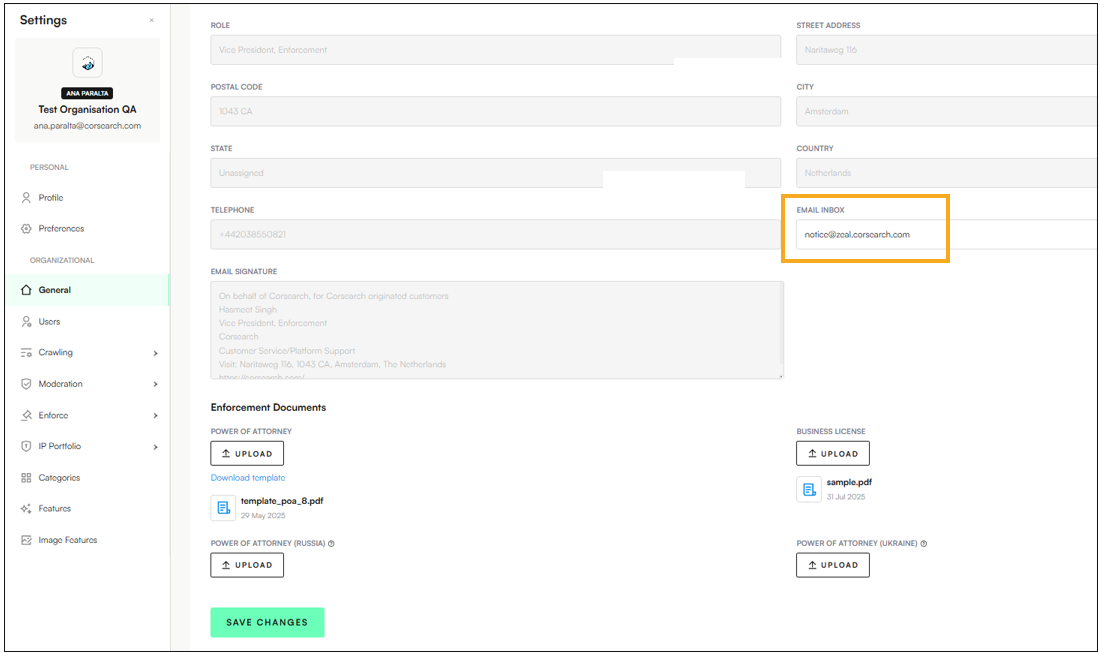
Navigate to Settings > General
Fill in the Email Inbox with your enforcement email address:
Click Save Changes.
How do I test it?
Send an email from an external email address to the @zeal.corsearch.com email address and check that it arrives where you expect (in the inbox where you’re currently managing manual email takedowns for the brand(s)).
Use the Notice View in Zeal 2.0 to send a takedown email and confirm that the email is copied into the same location.
