The Seller Network is a feature that automatically groups connected infringing accounts, sellers, and websites into unified clusters. By linking fragmented digital identities through shared contact information, the system allows users to identify and investigate entire networks of connected entities rather than addressing individual accounts in isolation.
The clustering feature uses a deterministic, rules-based mathematical model rather than Machine Learning (ML) or probabilistic guessing. Every link between entities is established based on concrete, shared contact data.
The system evaluates contact details (phone numbers, emails, social handles, WeChat/WhatsApp) scraped from account bios, post descriptions, and images. It draws a direct link between any two accounts that share at least one identical contact value, regardless of the platform (e.g., linking a Facebook account and a TikTok account sharing the same phone number).
The system runs a full recalculation every Saturday, rescanning all historical and newly uploaded accounts.
Phase 1: Discovering Connections: The system evaluates all known sellers ("posters") and websites. If any two entities share identical, normalized contact information, a direct link is established.
Phase 2: Grouping the Network: The system applies a transitive ("friend-of-a-friend") rule. For example, if Seller A is linked to Website B, and Website B is linked to Seller C, all three are grouped into a unified cluster.
Phase 3: Aggregation & Profiling: Once the cluster is formed, it is saved to the database, and aggregate statistics (total posts, moderation percentages) are calculated.
To ensure accurate matching, the system standardizes contact data before comparison:
Phone Numbers: Must be longer than 5 digits (after excluding leading zeros) and cannot be all zeros.
Email Verification: Must conform to standard email formatting rules.
Social Handles: Must pass basic validity checks (e.g., cannot be all zeros).
The criteria for linking two entities is always a shared, normalized contact point. The system organizes the backend depending on the entities' current cluster status:
Entity A Status | Entity B Status | System Action |
Not Clustered | Not Clustered | Creates a brand-new cluster containing both Entity A and Entity B. |
Already Clustered (Cluster X) | Not Clustered | Adds the unclustered entity into the existing Cluster X. |
Already Clustered (Cluster X) | Already Clustered (Cluster Y) | Merges Cluster X and Cluster Y into one unified cluster (subject to safety limits). |
Clusters will include all accounts found from across all of Corsearch’s database, based on the linked contact information so that you get the full picture of the Seller Network.
Users can click into any cluster to explore:
📄 All accounts in the cluster
🚩 All infringing posts, images
📬 Connection Reasons - Contact information
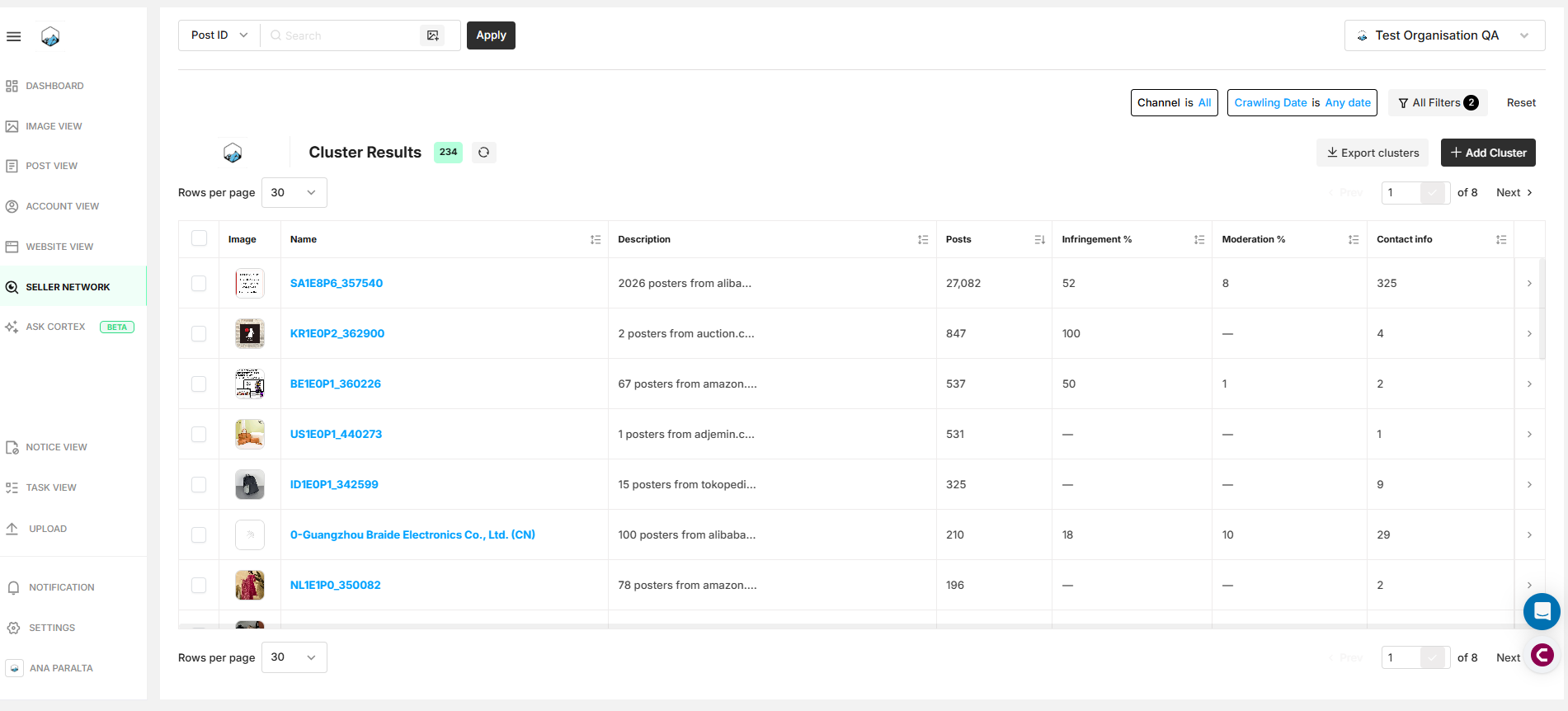
In Seller Network view, clusters are ranked by the number of potentially infringing posts, with the highest listed first. The Seller Network displays the following important features and information:
Search Bar & Filters – Narrow results by date, geography, label, and more.
Export – Export all filtered clusters in Excel format.
Rank – Reflects the overall severity of the cluster based on the number of posts associated.
Description – Brief description of the cluster and its infringing elements.
Posts – Total number of moderated and unmoderated posts present in the cluster.
Infringement % – The percentage of infringing posts relative to the total number of posts within the cluster.
Moderation % – The percentage of moderated items in the cluster.
Contact Info – Number of contact information elements (i.e. emails, phone numbers).
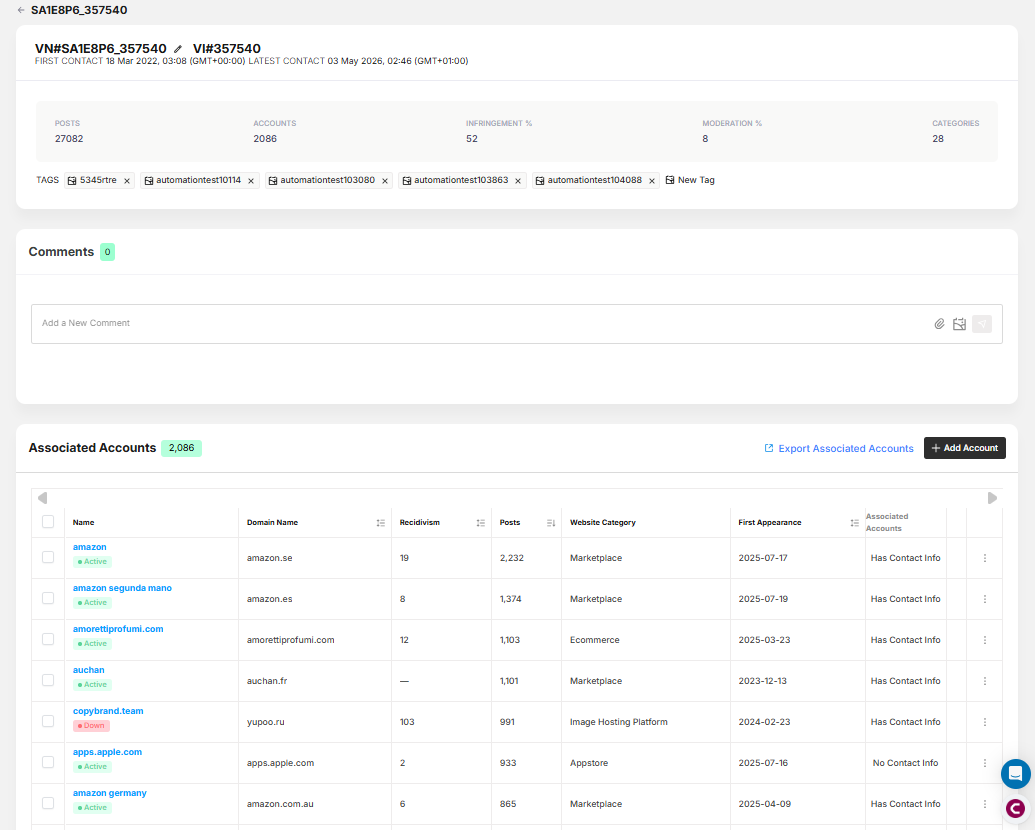
Clicking on a cluster will open it in a new window, displaying the following information:
ID/Name & Creation Date/Last Update – The name can be edited by clicking on the pencil icon.
Seller Network Details – Number of posts & accounts/sellers present in the cluster, percentage of infringing posts, percentage of moderated posts, and categories (i.e. apparel, accessories, etc).
Tags – All tags applied to this cluster.
Images – All images present in this cluster.
Associated Accounts – All accounts/sellers who appear in this cluster.
Related Posts – All posts present in this cluster.
Comments – To comment, type @username plus your message, click the arrow to submit, and use the paperclip icon to attach files or reference images.
Users can also:
Export all Associated Accounts in a Cluster
Manually Add Accounts to a Cluster.
Linking is an exact-match process; there are no per-link confidence scores. Because the transitive rule poses a risk of "over-clustering" (linking unrelated entities due to a generic customer service number or spam email), the architecture includes hardcoded safety limits.
Limit | Description |
MAX_MATCHED_PER_CONTACT = 100 | If a single phone number or email is shared by more than 100 distinct entities, the system ignores it. |
MAX_MATCH_GROUP_SIZE = 100 | A single cluster cannot exceed 100 total members. |
MAX_CONTACTS_PER_POSTER_WEBSITE = 100 | A single node (seller or website) cannot have more than 100 contact points evaluated. |
ALLOWLISTING | Known, legitimate brand entities and websites are strictly excluded from the clustering process. |
