Labels are the categories or infringement types used to classify different kinds of content across the platform. They help organize posts, images, sellers, and websites based on the signals they present.
These labels work together to give you a clear, consistent view of risk and legitimacy across all content.
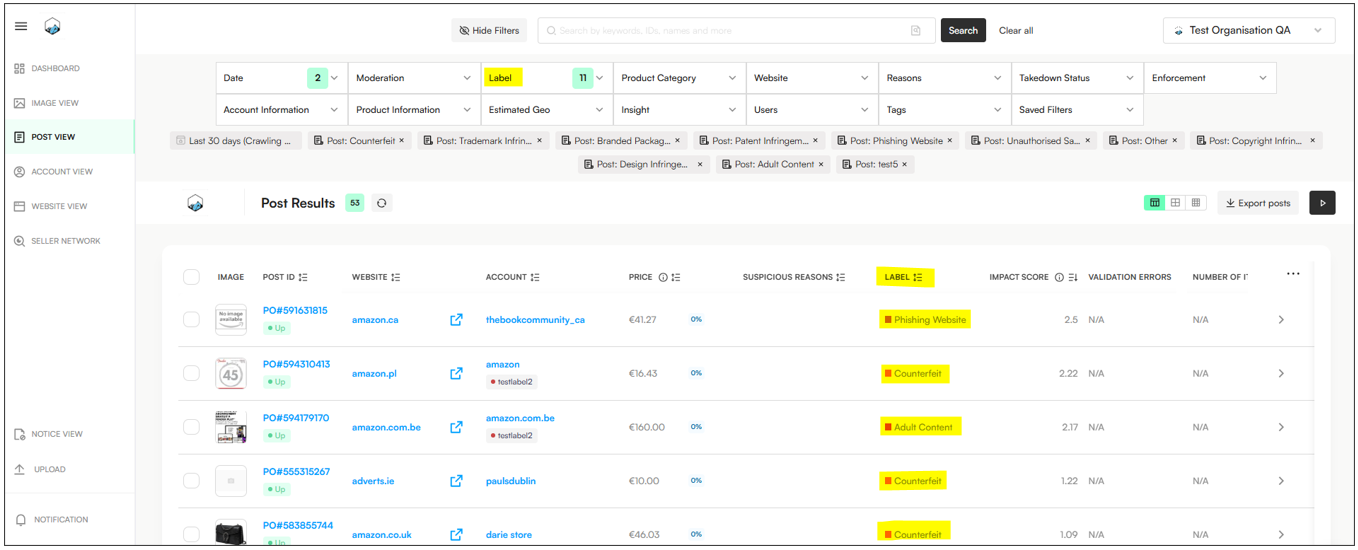
Note: Labels are customizable. Users can create labels with any name, choose their color, and use them to represent infringement types, trust levels, or any classification your workflow requires.
Labels can be applied automatically through auto-moderation rules or manually by moderators, and they exist at several levels:
Post Labels – Used to classify listings, often aligned with takedown reasons.
Image Labels – Used to categorize individual images.
Website / Account Labels – Used to classify seller accounts or domains, including identifying trusted or whitelisted entities.
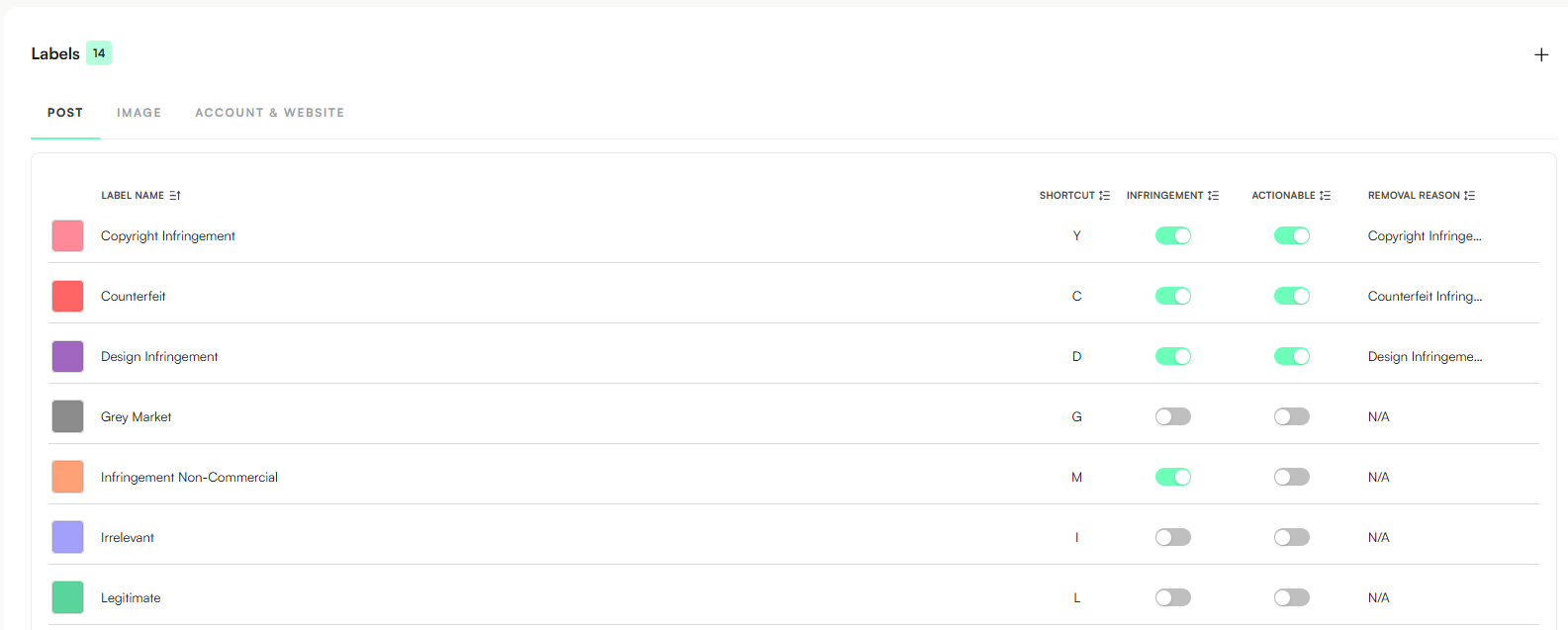
Client Migration: Existing Labels from Talisman & Zero are already added and available in the Settings page (such as Counterfeit, Trademark Abuse and Legitimate, for example).
Default Labels: Applied to every account (Legitimate Sellers / Counterfeit / Trademark / Design Infringement).
Roles & Permissions:
All users can view Labels.
Only Admins can modify Labels.
Go to Settings → Moderation → Labels
Select the tab where you want to create Labels for: Posts, Images, Accounts & Websites
Create a new label
Click the + icon or Add New Label.
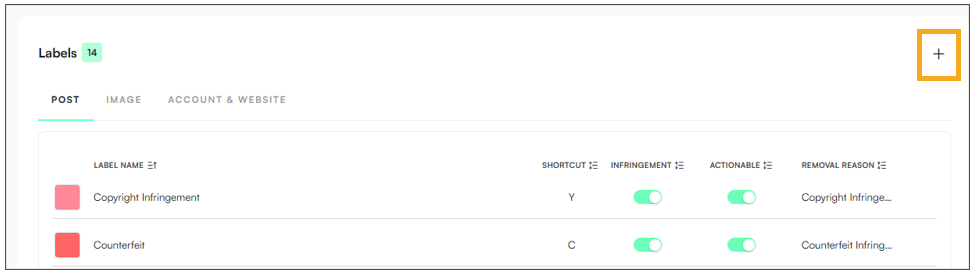
Choose a color - Select a color to help visually identify the label.
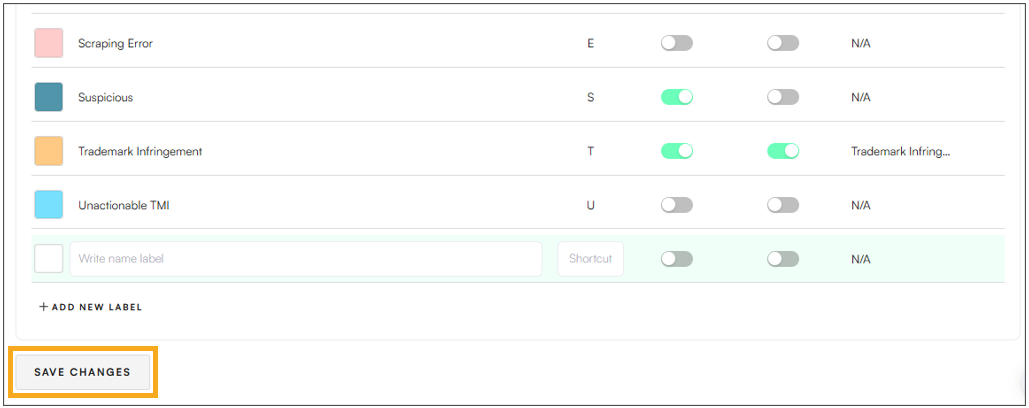
Name the label
Enter a clear name (e.g., Counterfeit, Legitimate, Suspicious).
Set infringement options (if applicable)
Toggle Infringement → ON if the label represents an infringement type.
Toggle Actionable → ON if the label should be available for enforcement actions.
Save
Click Save Changes to finish.
Label | Category Type | Used In | Description |
Counterfeit | Actionable Infringement | Images, Posts, Accounts & Websites | Fake or replica product pretending to be genuine. Uses the brand’s name or logo illegally. |
Trademark Infringement | Actionable Infringement | Images, Posts, Accounts & Websites | Unauthorized use of a registered brand name, logo, or symbol. |
Copyright Infringement | Actionable Infringement | Images, Posts | Uses copyrighted images, artwork, or text without permission (e.g., stolen visuals). |
Design Infringement | Actionable Infringement | Posts | Copies a brand’s registered design or product look (e.g., bag shape, pattern). |
Unauthorized Seller | Actionable Infringement | Accounts & Websites | A seller offering genuine products but not officially approved or licensed by the brand. |
Phishing | Actionable Infringement | Accounts & Websites | Fake or impersonating site/account trying to steal personal data or money. |
Suspicious | Potential Infringement | Images, Posts, Accounts & Websites | Something looks off — could be fake or infringing, but needs further review. |
Counterfeit Non-Commercial / Infringement Non-Commercial | Potential Infringement | Posts | Non-selling or fan-made use of IP (e.g., personal crafts or fan posts). Not for profit. |
Unactionable TMI | Potential Infringement | Images, Posts, Accounts & Websites | Content should be marked as Unactionable TMI when it shows potential infringement indicators, but cannot be enforced due to limitations such as legal, regional, or platform restrictions. |
Potentially Whitelisted or Impersonating | Potential Infringement | Accounts & Websites | Might be an approved or official-looking account but resembles an impersonator — needs manual verification. |
Official Photo | Non-Actionable | Images | Image from the brand’s official campaign or source. |
Official Store | Non-Actionable | Accounts & Websites | Verified official brand store or social media account. |
Authorized Seller | Non-Actionable | Accounts & Websites | Brand-approved retailer or partner. |
Legitimate | Non-Actionable | Images, Posts, Accounts & Websites | Confirmed genuine or authorized product or content. |
Grey Market | Non-Actionable | Images, Posts, Accounts & Websites | Genuine product sold outside authorized channels (e.g., parallel imports). Not fake but not brand-controlled. |
Irrelevant | Non-Actionable | Images, Posts, Accounts & Websites | Unrelated to the brand (e.g., same name, different product). |
Scraping Error | Non-Actionable | Images, Posts | The system captured bad data or couldn’t load the listing properly. |
RISE Error | Non-Actionable | Images | Internal image recognition or processing error. |
Out of Scope | Non-Actionable | Images, Posts, Accounts & Websites | Content outside monitoring scope, but still relevant to the brand (e.g., unrelated category, a specific campaign or product line and regions not in the current scope). |
