Enforcement is the process of taking action to remove, restrict, or disable infringing or unauthorized content once it has been identified and validated.
In practical terms, enforcement means sending a formal notice to the responsible party—such as a marketplace, social media platform, website owner, hosting provider, or other intermediary—requesting that the infringing content be taken down or access to it be limited.
Zeal’s Enforcement Workflow is designed to guide each post in a structured and transparent way. Below is a step-by-step overview of how enforcement actions are executed in Zeal 2.0 (after moderation).
Enforcers
Brand Partners
Validators (self-servicing clients)
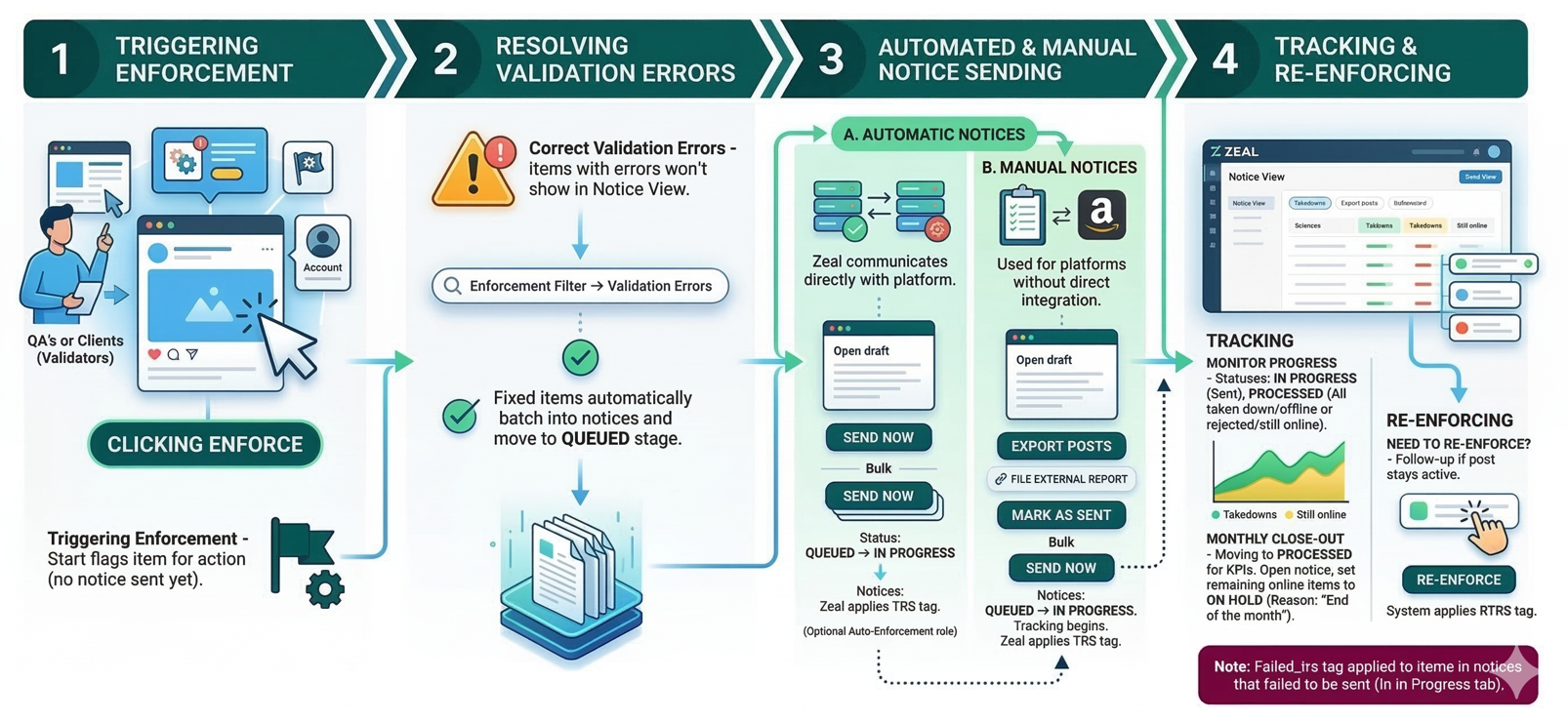
Enforcement begins when someone clicks “Enforce” on a post, website or account. This action marks items for enforcement - It does not send an enforcement notice yet!
Clicking Enforce can be done individually or in bulk.
If auto-enforcement rules are set, Zeal 2.0 auto-triggers enforcement when criteria are met.
Quality Analysts
QAs either click Check & Enforce or just Enforce
Clients (Validators) & Brand Partners
Validators click Validate & Enforce or just Enforce
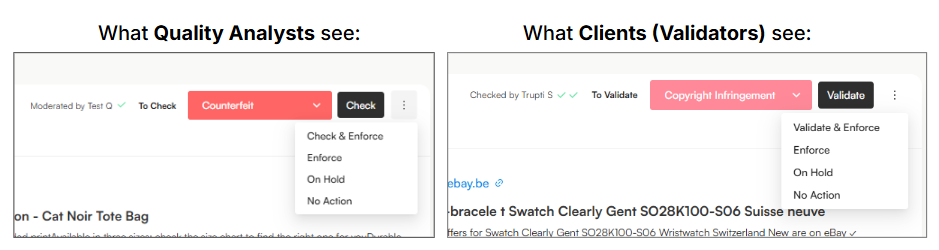
Action Trigger | Who Clicks Enforce | What it Does in Zeal |
Check & Enforce | Quality Analyst (QA) | Reviews the content first, confirms infringement details, then immediately marks the item for enforcement. |
Enforce | Quality Analyst (QA) | Directly marks the item for enforcement (item has already been reviewed/checked prior, or review has been skipped). |
Validate & Enforce | Client (Validator) / Brand Partner | Confirms the infringement decision and immediately marks the item for enforcement. |
Enforce | Client (Validator) / Brand Partner | Directly authorizes the item for enforcement (item has already been reviewed/validated prior, or validation has been skipped). |
After QA selects "Check and Enforce" or "Enforce", users must confirm required enforcement fields are preselected, where validation errors occur.
Validation Errors prevent an item from entering the enforcement queue when a post is marked for enforcement but one or more mandatory fields are incomplete or incorrect.
To identify any issues, users can use the Validation Errors filter:
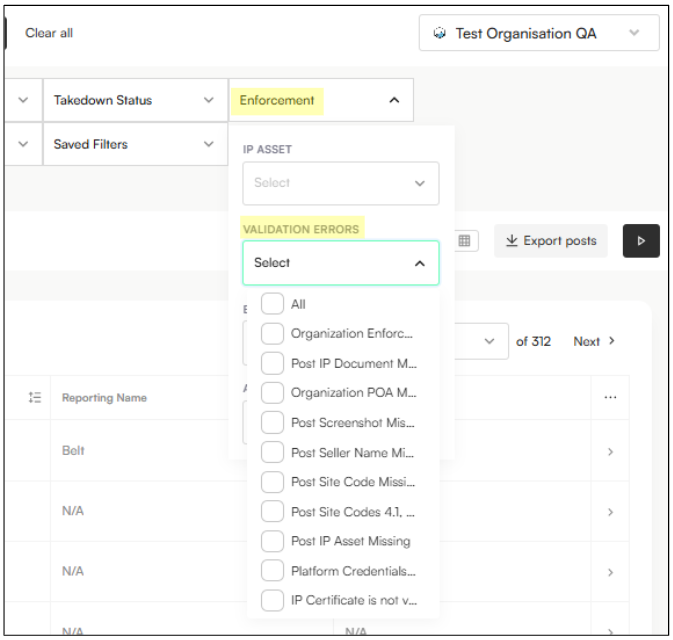
This highlights posts missing key enforcement elements or with incorrectly populated fields.
A warning icon appears next to the label on the right-hand side for any post with validation errors:

Users can resolve validation errors directly on the listing or in bulk, ensuring that every notice is legally complete and accurate.
Note: Once validation errors are resolved, notices are automatically visible in the Notice View (Queued) for the next stage of processing.
Validation Error | What It Means | How to Fix It |
Organization Enforcement Settings Incomplete | Required organization-level enforcement details are missing. | Go to Settings → General and add the official website and enforcement email, then save changes. |
Post IP Document Missing / Expired / Incomplete / Exceeding Platform Limits | The IP document linked to the post does not meet enforcement requirements. | Go to Settings → IP Portfolio → IP Certificates, upload or update the IP document, and ensure it meets platform requirements. |
Organization POA Missing | A valid Letter of Authorization (LOA/POA) is not uploaded for the organization. | Go to Settings → General, upload a valid LOA. |
Post Screenshot Is Missing | A required screenshot of the infringing content is not attached. | Open the post or select multiple posts and click ‘Recrawl post’ or use the Cyborg Extension. |
Post Seller Name Is Missing | The seller or account name is not captured on the post. | Open the post details, add the seller or account name. Refresh the page. |
Post Site Code Is Missing | No site code has been selected for the post. | Open the post, select the appropriate Site Code. Refresh the page. |
Post Site Codes 4.1, 4.2, and 4.3 Are Not Enforceable for eBay | The selected site code is not currently supported for eBay enforcement. | Select an enforceable site code for eBay. If none apply, the post cannot be enforced at this time. |
Post IP Asset Missing | No IP Asset (e.g. trademark or copyright) is linked to the post. | Open the post, select the correct IP Asset, and ensure it matches the infringement type and platform. |
Platform Credentials Missing | Enforcement credentials for the platform are not configured. | Go to Settings → Enforce → Platform Credentials, add or update the required credentials, and confirm they are active. |
IP Certificate Is Not Verified for Portal Auto-Enforcement | The IP Certificate in Zeal does not exactly match the platform portal setup. | Go to Settings → IP Portfolio → IP Certificates and ensure the registration number, region, and brand name exactly match the platform portal (e.g. Shopee), then verify the certificate. In the platform compatibility verified field, select the platform(s) that requires compatibility. |
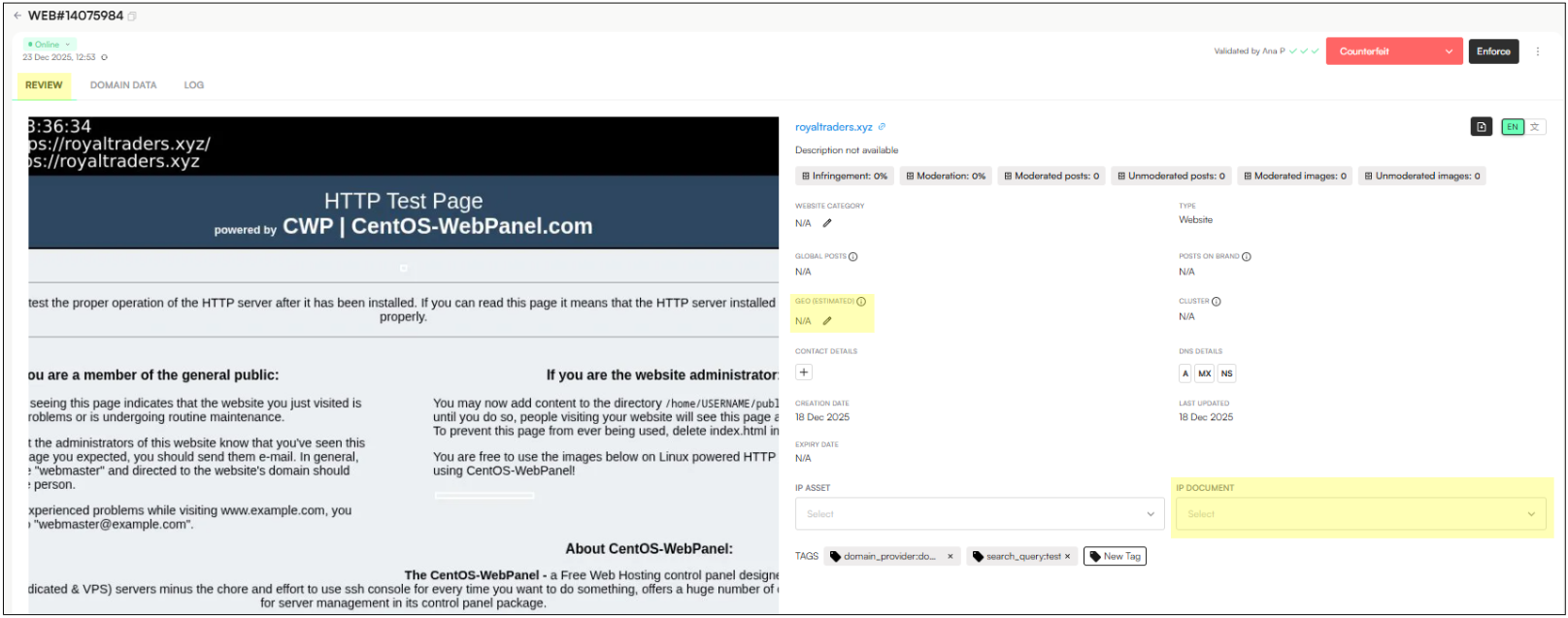
Website does not have a country code assigned | The domain does not contain an assigned country (estimated geo field). | Select the country for the domain on the Geo (estimated) field. If unsure, select the option ‘Global’. |
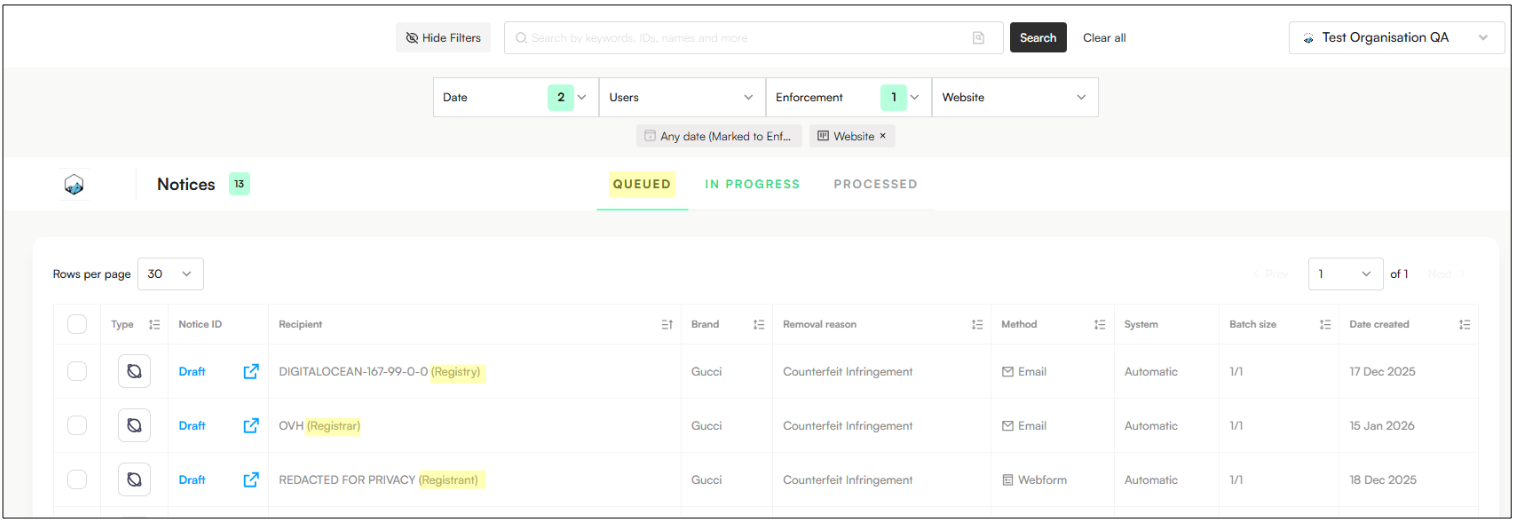
After validation, notices appear in the Notice View and the Queue stage. Click Send Now (individual or bulk) to send them to platforms and move them from Queue to In Progress.
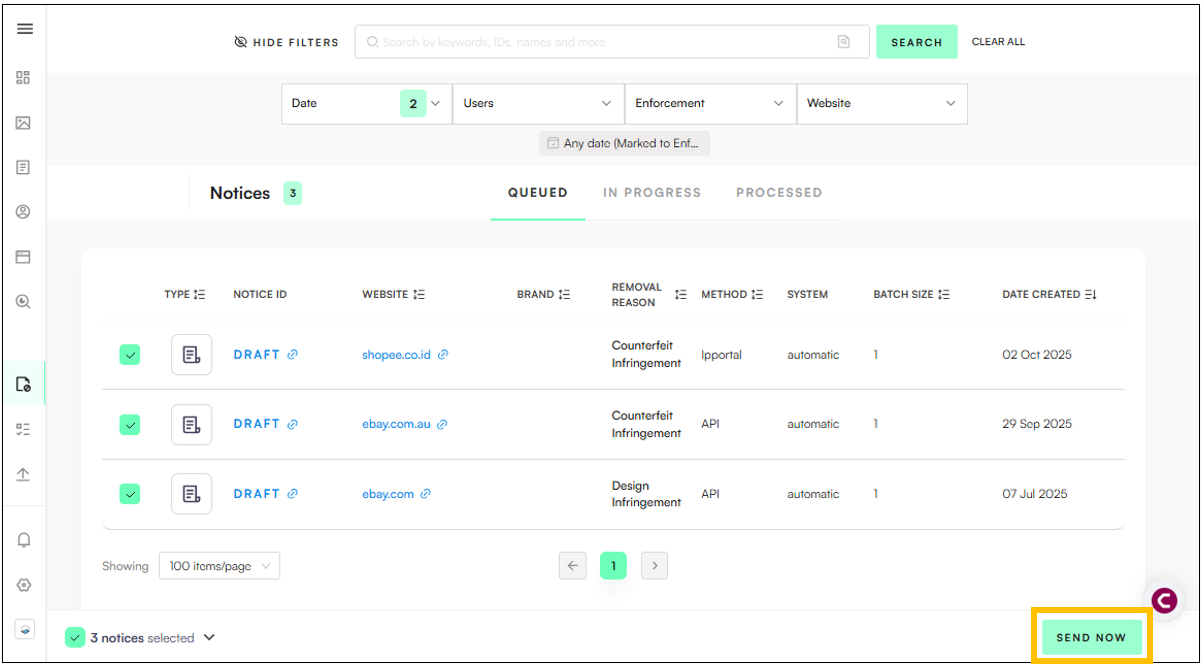
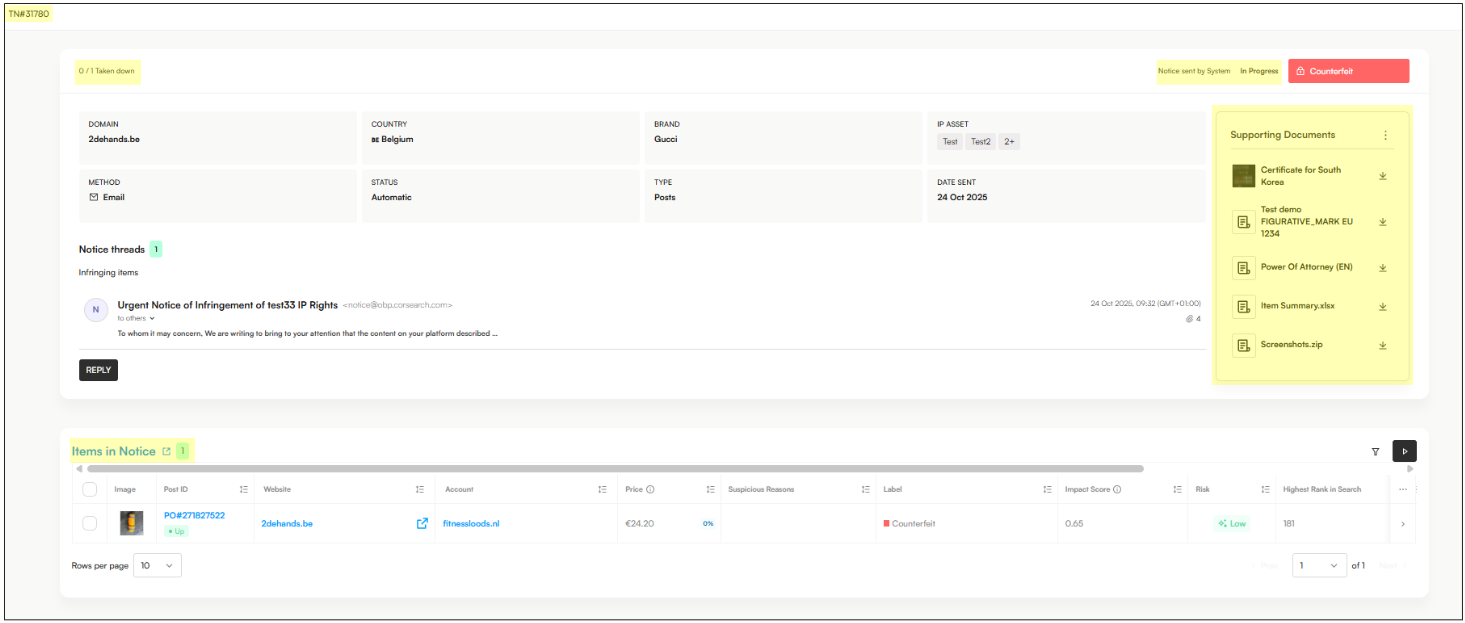
Clicking on the Notice ID (TN#0000) opens the notice detailed view, which includes:
Enforcement summary: Number of posts removed (top left) and items still awaiting takedown (top right, “Pending Takedown”).
Items in Notice section: Each post’s current status is displayed as Active or Down.
Related accounts and items are also visible, providing context for broader enforcement actions.
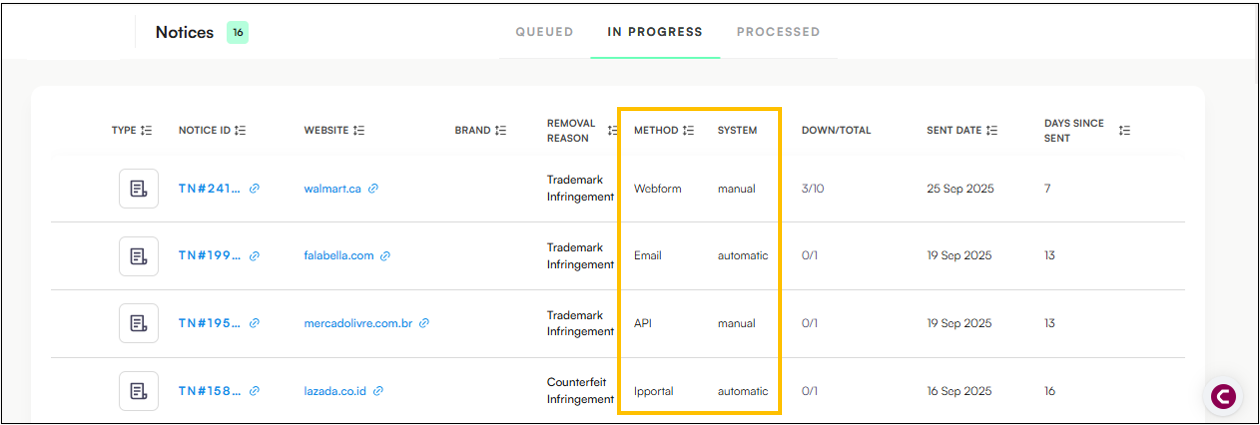
Within the Notice View, users can access key enforcement details through clear, structured columns:
Method – Indicates the auto-enforcement method used to issue the notice. Possible methods include Email, API, IP Portal, or Webform, depending on the platform’s integration.
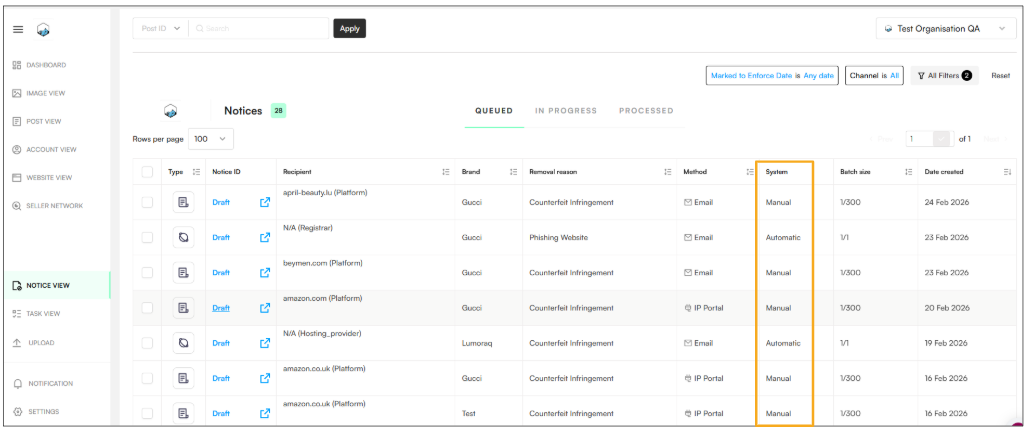
System – Specifies whether the enforcement process for the domain or platform is automated.
If automated, this column displays “Automatic.”
If manual action is required, it displays “Manual.”
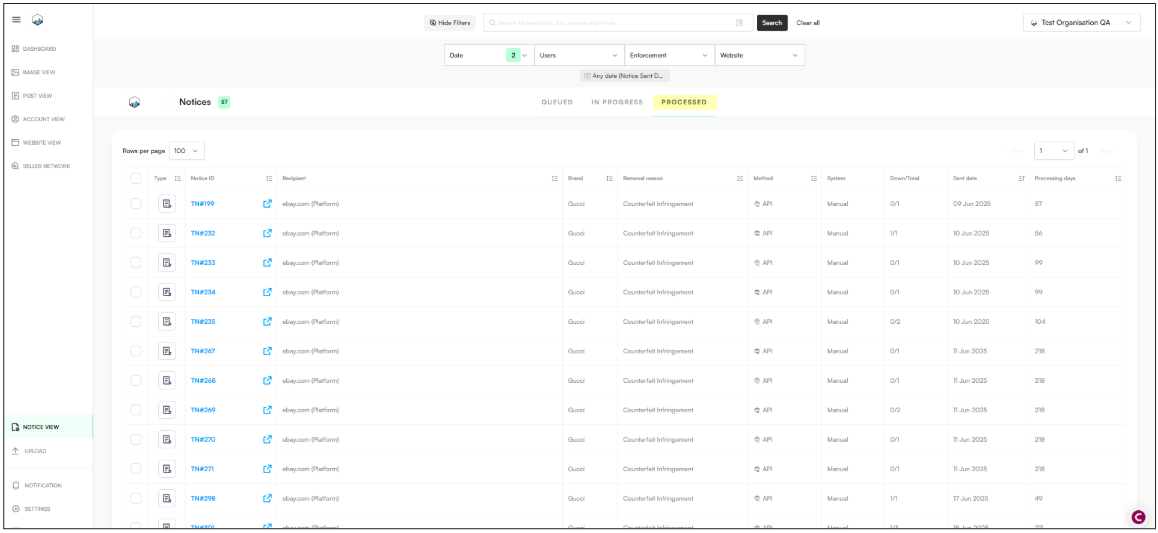
When all posts in a notice are confirmed processed, the notice moves from In Progress to Processed. This stage shows the batch size, number of offline posts, and the notice sent date for audit tracking:
Note: All items in notices already contain the TRS (takedown request sent) tag. This tag is automatically applied when listings are sent from the Notice View. When items require to be re-enforced, the system will apply also the RTRS tag.
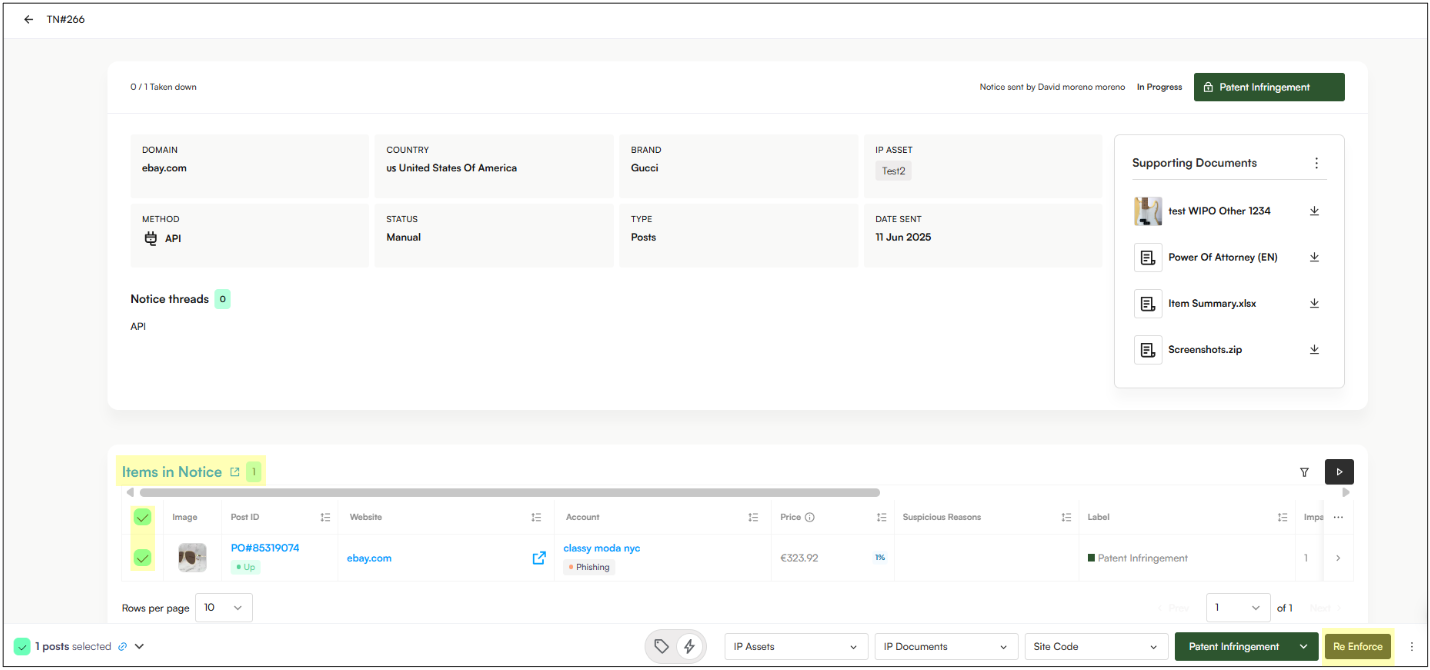
Open the Notice View → In Progress → Select the notice with the items you want to re-enforce
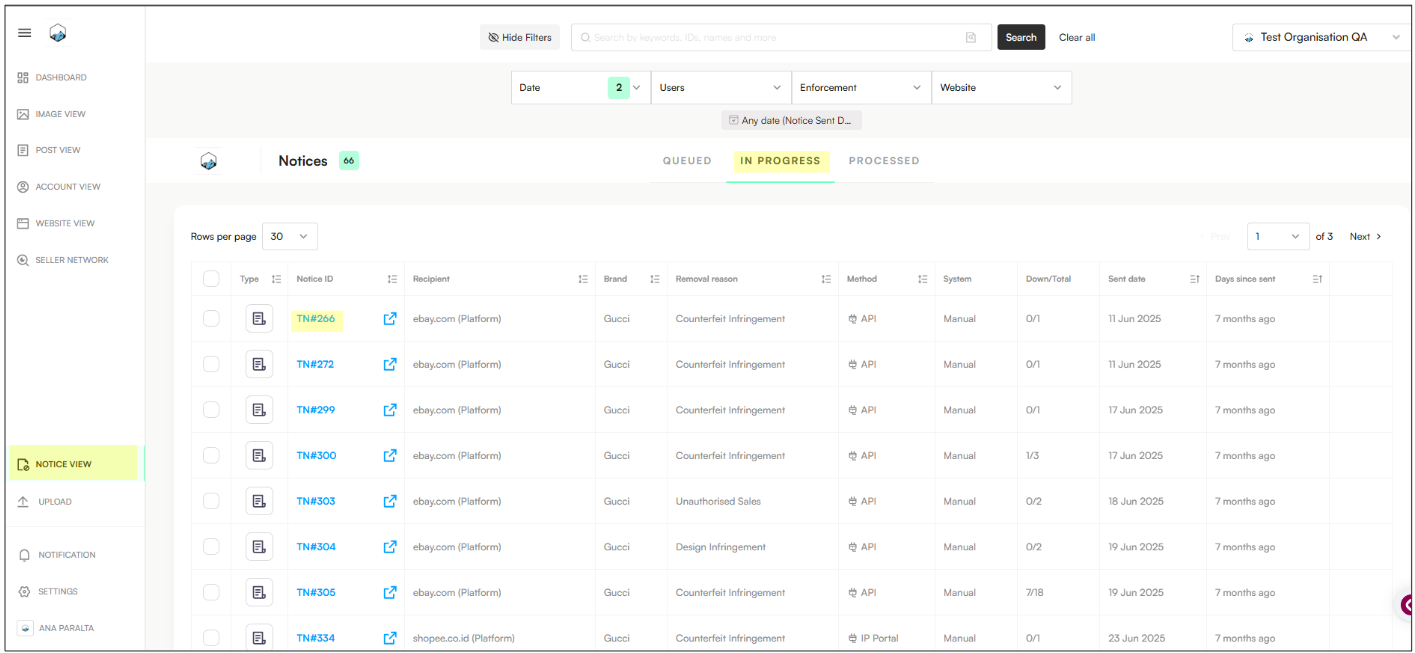
Scroll Down to Items in Notice and select them.
Click Re-Enforce and repeat the process.
Note: When items are re-enforced, the system automatically applies the RTRS tag to those items.
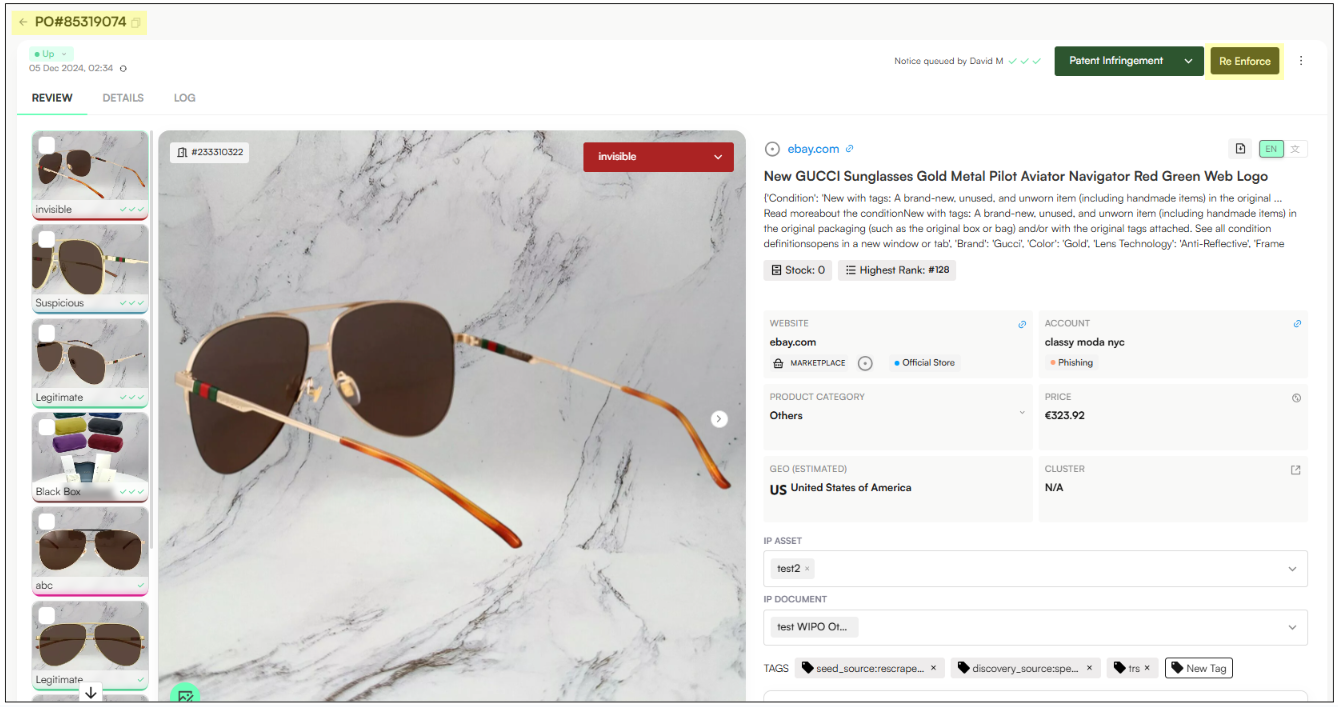
You can also Re-Enforce by clicking the Post ID and opening the post in a new tab:
In Zeal, infringing items ready for action are grouped into batches under a unique Notice ID in the Notice View. The Notice View tracks these notices, but sending depends on the assigned System.
Zeal communicates directly with the platform/recipient:
Manual Trigger: Clicking 'Send' or 'Send Now' sends the notice immediately.
Full Automation: If Auto-Enforcement Rules are configured, Zeal sends the notices as soon as they're generated.
Result: Notices move from Queued to In Progress when sending is triggered.
Used for platforms without direct integration (e.g., IP portals or webforms).
External Action: The user files the report on the external site.
Logging the Action: After reporting, return to Notice View and click 'Mark as Sent' (in a draft) or 'Send Now' (bulk).
Result: This confirmation moves the notice to In Progress so Zeal can track takedown status.
Fix validation errors (e.g., IP Asset, IP Certificate).
Open Notice: In the draft, click the Form/Link to reach the external reporting page.
Report externally: Complete the takedown request on the platform.
Log action: Return to Zeal and click 'Mark as Sent' (individual) or 'Send Now' (bulk).
Note: Clicking 'Mark as Sent' is required to move a notice from Queued to In Progress so Zeal can begin status checks.
Website and domain enforcement follows a distinct process. At present, website and domain enforcement is supported for the following labels:
Counterfeit
Trademark Abuse
Design Rights
Copyright Abuse
Unauthorized Sales
Impersonation
Phishing
Email Enforcement Only (for now)
All website and domain enforcement is conducted via email
No API, portal, or webform automation is available yet
Go to the Review tab and ensure Estimated Geography is filled. Zeal needs this to auto-assign the correct IP document.
Open the Domain Data tab to view contact details for Registrar, Registrant, Hosting Provider, and DNS. If missing, you can add them in the notice draft.
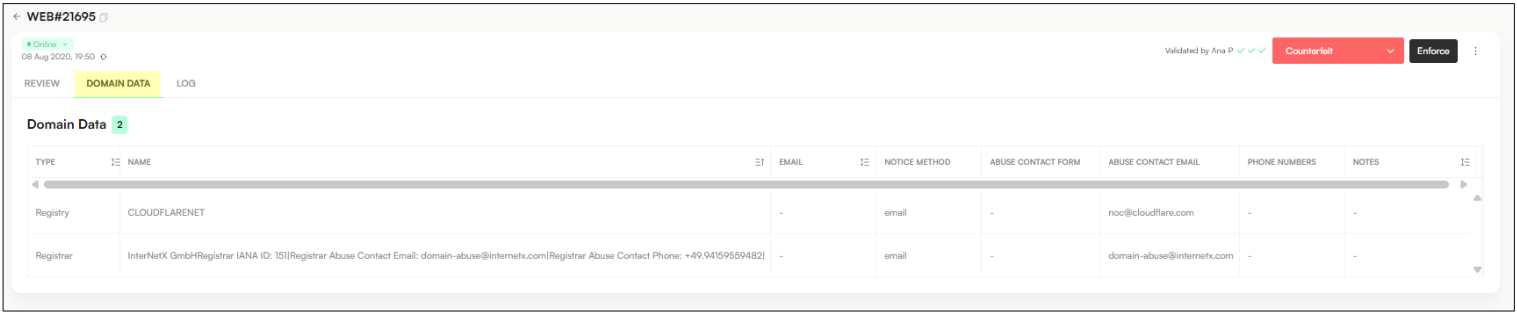
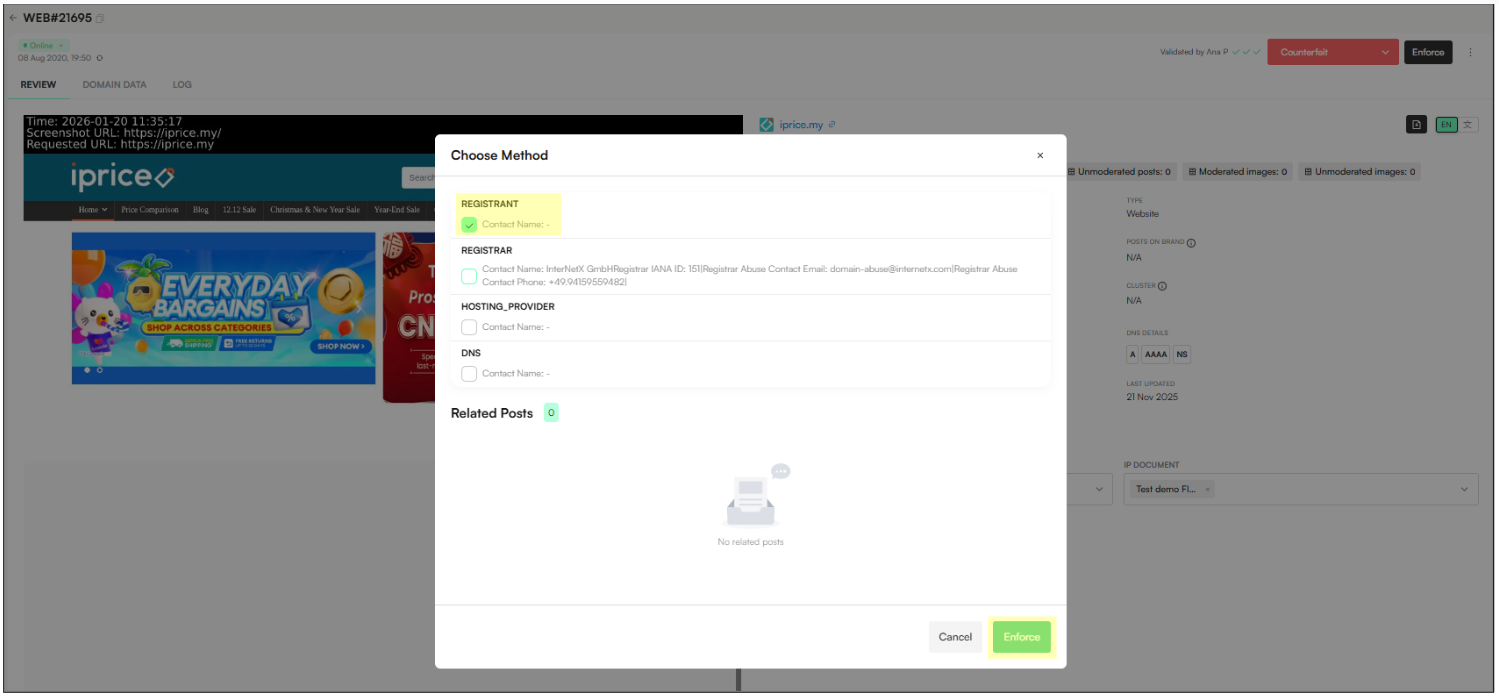
Select the entity/entities to enforce (e.g., Registrant, Registrar, DNS).
Click Enforce. The domain appears in Notice View as a draft (if no validation errors). The notice is not sent yet; it stays in the Queue until sent automatically by rules or manually via Send Now.
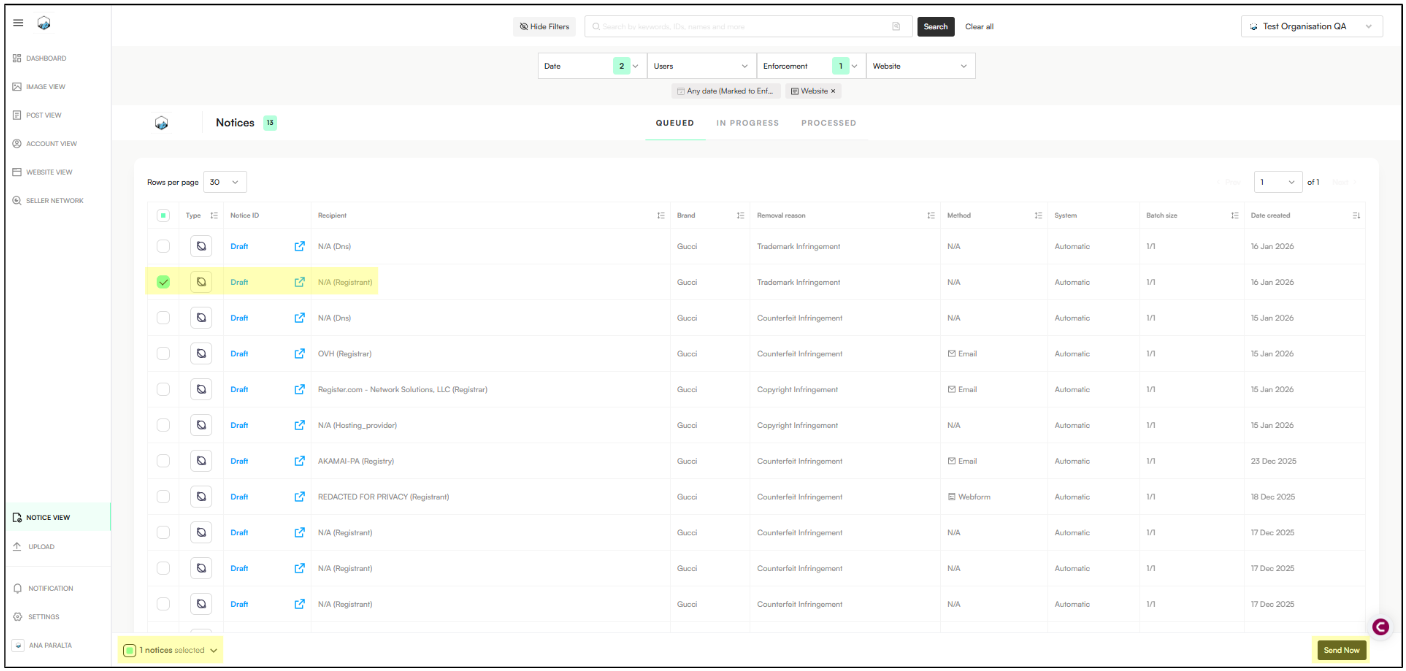
Open the draft. If Zeal auto-detected registrant info, the recipient name, email, and message will be populated.
If missing or incomplete:
Click the pencil icon to edit.
Update recipient name and email.
Review the message to ensure the registrant’s name is correct.
Click Send Now.
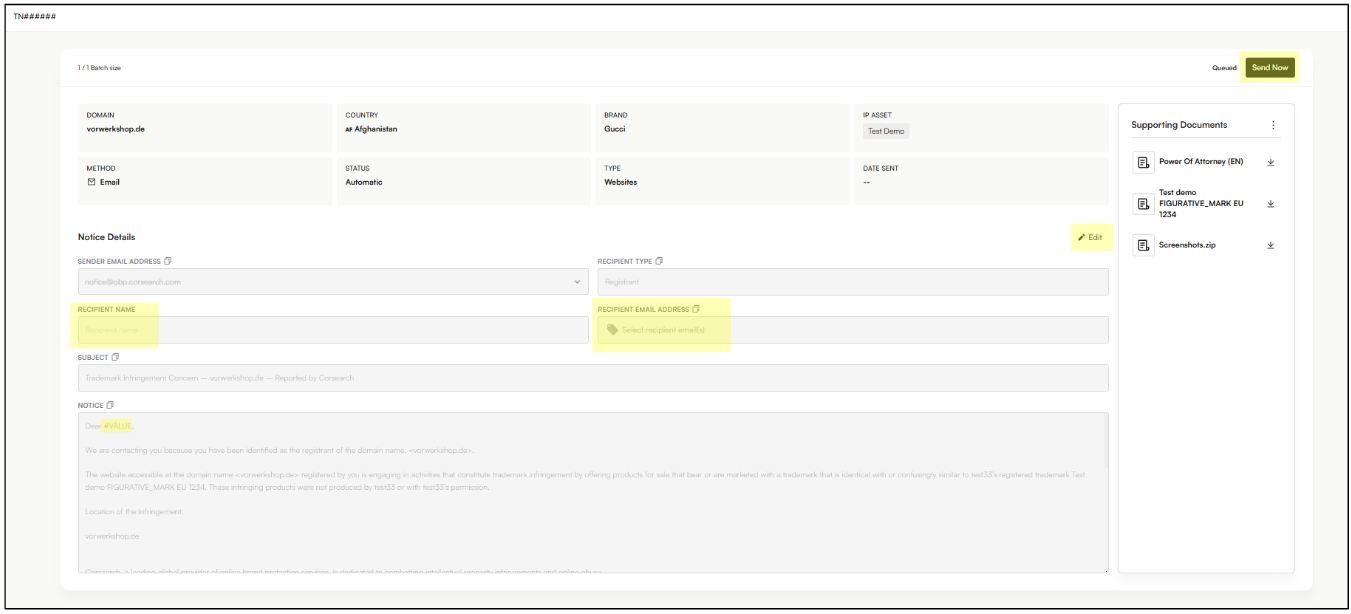
The notice will move from Queued → In Progress.
Open the item to re-enforce:
For domains, open in Website View.
For websites/webpages, open in Post View.
Open in a new tab: Click the ID to open the site/page and click Re-Enforce.

Review enforcement entities: The Re-Enforce window shows additional entities (e.g., registrant, registrar, DNS provider, hosting provider).
Note: The registrant will be preselected (initial enforcement).
Select additional entities: Choose one or more extra entities and continue to generate enforcement notices.
Click Enforce
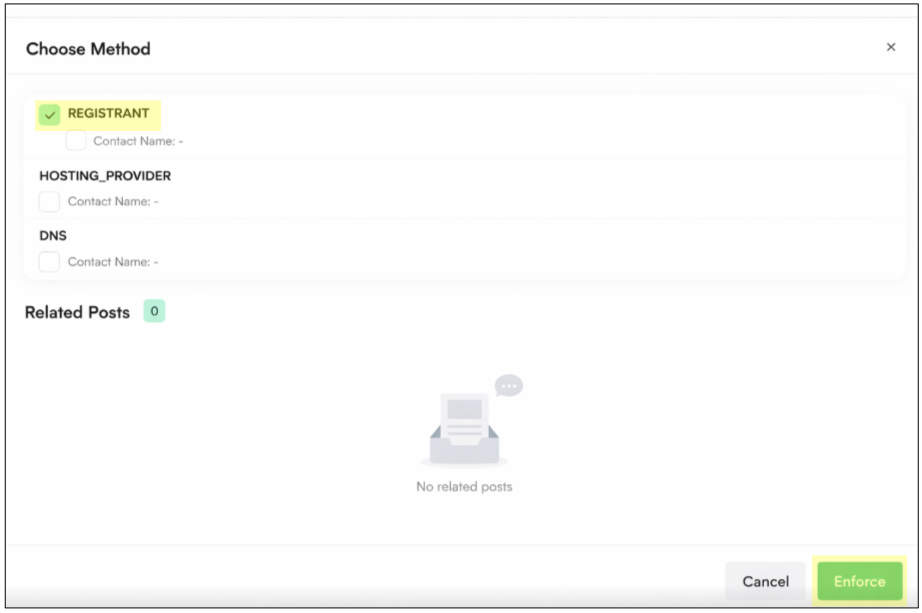
For each entity selected, the system will automatically create a separate notice draft in the Queue tab of the Notice View, with each notice targeting the selected entity individually:
If the Enforce button does not appear for Posts & Accounts, make sure to configure the related domain in the Enforce Domains section.
Example:
“I am not able to see the Enforce button for a Post operating on ebay.at in Post View”

Solution:
Open the Settings
Navigate to Enforce Domains
Add the all ebay branches to the list, including ebay.at:
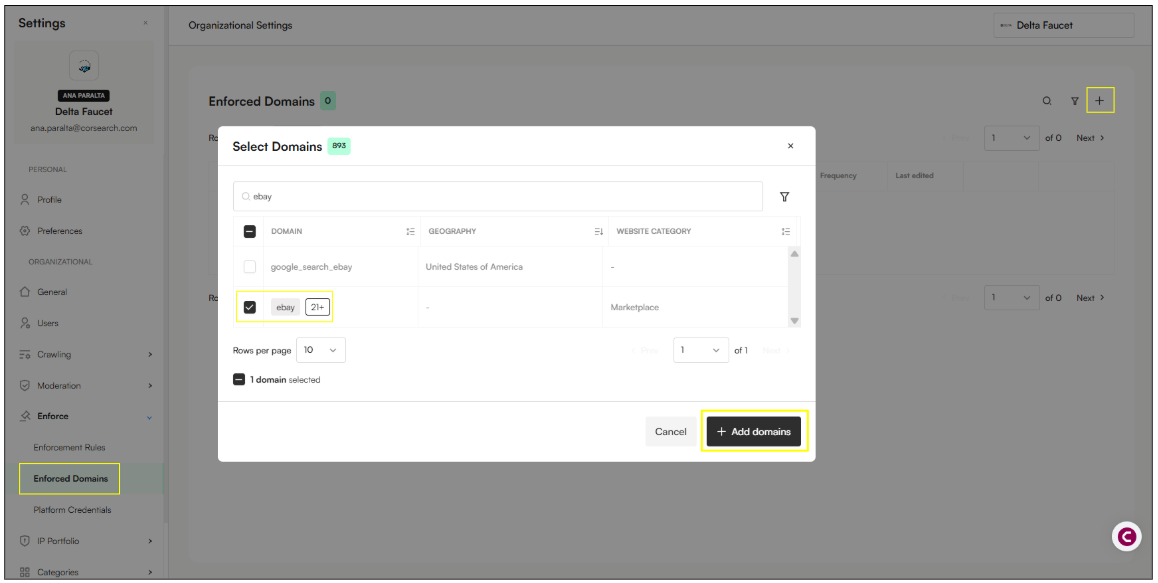

If the Enforce button does not appear after adding the domain to the Enforce domain section, please reach out to your BP Partner to raise a ticket to Tech.
Users do not repeat enforcement by sending the same notice through the same channel and expecting a different outcome.
Users should only proceed with a follow-up enforcement when one of the following applies:
A different enforcement method becomes available (e.g. a newly identified webform, alternative abuse contact, or different responsible party), or
The case progresses to a new escalation target.
After each enforcement action, allow 2–3 days for review and removal before:
Verifying the outcome, and
Proceeding to the next enforcement stage if no response or action is taken.
If no response or action is received, enforcement proceeds sequentially through the following parties. Each party should be contacted once, unless a different enforcement method is identified:
Enforcement Target | Max Attempts | Wait Time Before Next Action |
Registrant | 1 | 2–3 days |
Hosting Provider / CDN | 1 | 2–3 days |
DNS Provider | 1 | 2–3 days |
SSL Certificate Authority | 1 | 2–3 days |
Payment / E-Commerce Provider | 1 | 2–3 days |
Search Engine (Delisting) | 1 | 2–3 days |
Escalation to Website Enforcement Team | 1 | n/a |
The sequential escalation approach described above is optional for DIY (Do It Yourself) users!
Self-serviced users may instead choose to send enforcement notices to multiple entities at the same time (for example, registrant, hosting provider, and DNS provider), depending on their enforcement strategy and urgency.
Google delisting works at the URL level (specific pages), but for Brand Protection purposes, the distinction between a "domain" and a "website" is vital for understanding what actually happens to the infringer.
Google delisting targets the visibility of the threat. We use it to strip infringing websites of their traffic by removing their pages from search results. However, if you want the domain actually deleted or transferred to you, we move beyond Google and go after the Registry/Registrar.
Google’s removal tools (like the DMCA/Copyright takedown) are designed to remove specific links from search results.
What happens: Google removes www.fakebrand.com/products/cheap-bags.
The "Domain" stays: The domain fakebrand.com still exists. If someone types the address directly into their browser, the site still loads.
Why it matters: Delisting is about killing the traffic. If a site isn't on Google, 90% of its potential customers will never find it.
Yes, but it's harder. To delist an entire domain (e.g., every single page under fakebrand.com), the brand owner usually has to prove that the entire site is dedicated to infringement.
The Corsearch Method: Corsearch submits "bulk" delisting requests. If we identify a site as a "rogue pharmacy" or a "piracy hub," we don't just report one page; we report every indexed URL on that domain to effectively "ghost" the entire site from Google.
Clients often use these terms interchangeably, but they are very different actions:
Action | Target | Result |
Delisting | Google Search | The site is "invisible" on Google but still live on the internet. |
Domain Suspension | Registrar (e.g., GoDaddy) | The domain is "killed." It won't load at all, even if you type it in. |
Hosting Takedown | Server (e.g., AWS/Cloudflare) | The content is removed from the server. |
If a domain is just parked (e.g., a blank page with ads) and not hosting a "website," Google delisting won't do much because there’s no content to rank in the first place.
For domains, you don't delist; you recover or suspend them using legal processes like UDRP (Uniform Domain-Name Dispute-Resolution Policy).
