Zeal 2.0 follows a structured workflow designed to balance scale, accuracy, and consistency, consisting of:
Auto-Moderation & Manual Moderation
Quality Check
Validation
Enforcement
This end-to-end process ensures that infringing content is identified and actioned efficiently.
Note: This workflow happens after data has been collected into Zeal 2.
Auto-moderation uses predefined rules to automatically classify (label) incoming content before human review.
Flags content using configurable rules based on keywords, domains, images, and other parameters.
Mark content as either:
Legitimate/Clean → safe, no infringement.
Potential Infringement → labelled/classified.
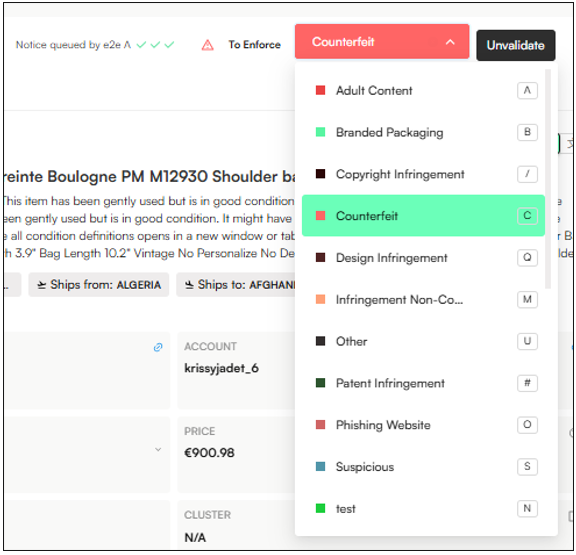
Moderation can also be done manually - it involves assigning a label to an item. Moderators replicate the same process as auto-moderation rules manually, applying rule logic to listings, posts, or accounts. This ensures that cases that still require nuance are still reviewed accurately.
Apply rule logic manually by scanning titles, descriptions, images, account details, and metadata.
Detect the same triggers as auto-rules (keywords, domains, imagery, behaviors) but with human judgment
Assign a label of an infringement type (counterfeit, unauthorized resale, phishing, impersonation, etc.)
Mark content as either:
Legitimate → safe, no infringement or content is authorised.
Potential Infringement → labelled/classified.
Assign potentially actionable labels (labels that are not a clear infringement but may have risk indicators), such as the Suspicious label.
When a label is applied—either by an auto-moderation rule or by a moderator—the workflow status updates from To Moderate to Moderated by, indicating whether the item was handled automatically or by a specific user.
When an item is moderated (labeled), it will display one check mark.

A Quality Check (done by Quality Analysts) is the step that follows moderation. It ensures that moderation decisions—whether manual or automated—are accurate, consistent, and aligned with brand and platform guidelines.
Perform quality checks on both manually moderated and auto-moderated items.
Ensure that moderation actions are accurate and justified.
Remove irrelevant items from Moderators’ queues when reviewing labeled content.
Correct/Update labels assigned incorrectly by moderators.
Verify the accuracy of:
Post labels
Image labels
Product category detection
Logo detection results
Check → Marks the item as quality-checked, without sending it for enforcement.
Check & Enforce → Marks the item as quality-checked and flags it for enforcement.
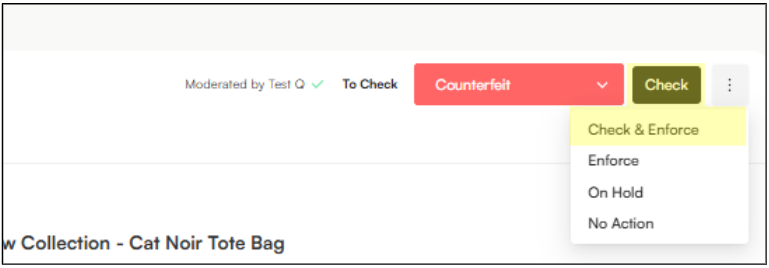
When an item is quality checked by a QA, it will display two check marks:
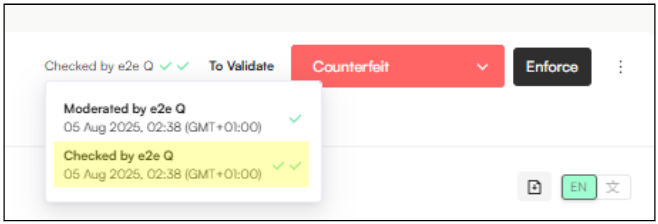
Validation comes after the Quality Check and is usually handled by clients or external reviewers. It gives them a chance to confirm whether a listing should move forward to enforcement. If validation isn’t needed, this step can be bypassed and the item can go straight from QA to enforcement.
Confirm enforcement eligibility
Ensure that listings selected for takedown truly meet the brand’s enforcement criteria and policies.
Apply brand-specific judgment
Allow clients to use their own commercial, legal, or regional knowledge that may not be fully captured by rules or internal review.
Approve or reject enforcement actions
Clearly signal whether a listing should proceed to takedown or be excluded from enforcement.
Provide accountability and confidence
Give clients visibility and control over enforcement decisions, increasing trust in the workflow.
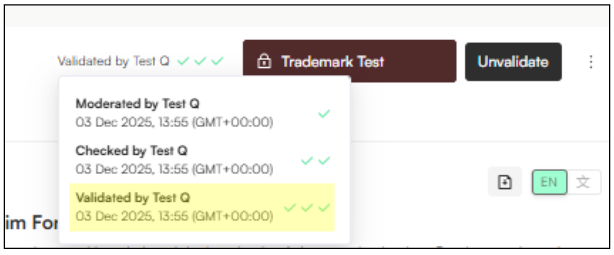
Validate → Client confirmation that the label has been correctly applied.
Validate and Enforce → Confirmation that the label of the item has been correctly applied, is infringing AND is marked for enforcement.
On Hold → The item needs to be paused while awaiting clarification or next steps.
No Action → The item has been reviewed and no further action is needed.
When an item is validated, it will display three check marks:
Enforcement is the final stage of Zeal’s workflow. At this point, enforcers—or automated takedown rules—use the applied labels to initiate removal actions against infringing content.
Prepare enforcement notices in the Notice View, with supporting information (IP asset, infringement type, platform/site code).
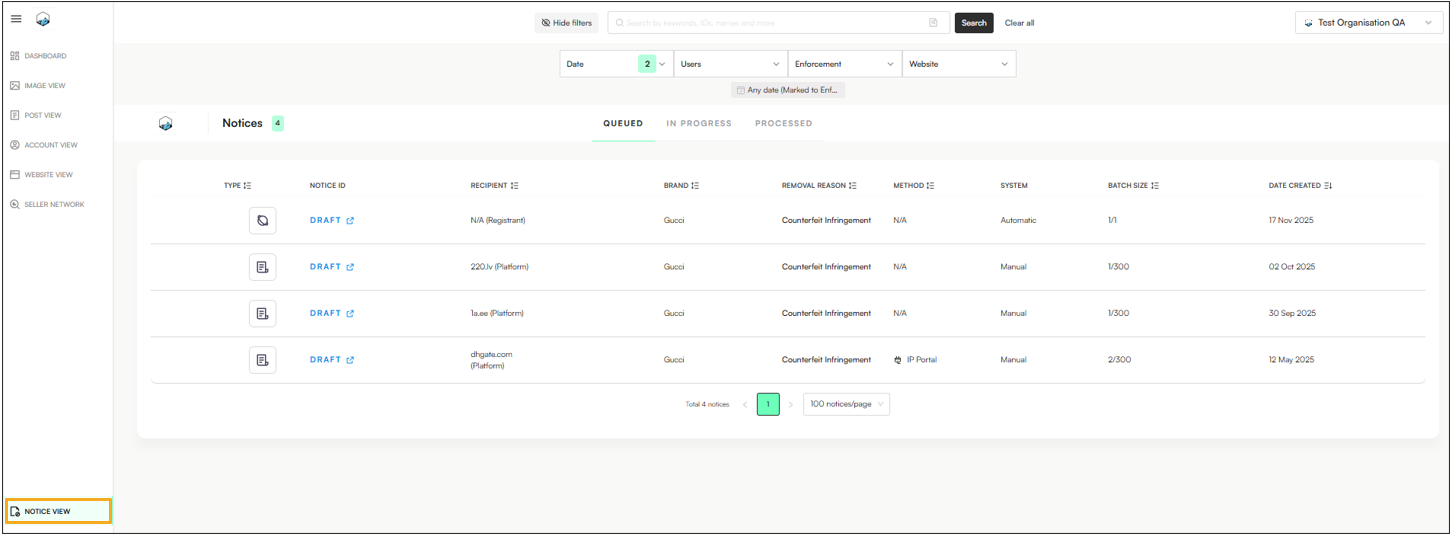
Submit takedown notices to marketplaces, websites, or social platforms.
Track status of requests to confirm removals.
Manage pushbacks & re-enforcement.
Stage | Who is Responsible | Purpose | Activities | Outputs |
Auto-Moderation | System / Configured Rules | Scale detection of obvious risks automatically | • Apply pre-set rules to detect risky keywords, domains, images, or behaviors | • Flagged content queue |
Moderation | Moderators | Apply the same detection rules manually to catch nuanced or missed cases | • Review content manually using rule logic (keywords, domains, images, behaviors) | • Content marked as clean or infringing through labelling. |
Labelling | Moderators/QAs | Classification of data | • Assign classification through labels (i.e counterfeit, trademark abuse, legitimate, etc) | • Structured case data |
Enforcement | Enforcers/Auto takedown Rules | Action against infringing content | • Prepare takedown requests | • Content removed from platforms |
